Throughout my PhD, I employed both Fortran and Python to generate the simulation data and analyse and plot it. The former, we used for crunching through the forward integration of large matrices, the latter for post-processing, analysis and producing, eventually, publication-ready figures.
Here, we are using the double pendulum as a “fun” example for the usage of f2py and the integration of Fortran with Python.
This post is also my first, a trial-run so to speak. As such, there isn’t anything particularly interesting or novel here, and I would recommended the references, or any thing else really, for real info. For example, everything here on the use of f2py is also in this recent blog post.
Some context
f2py was developed around the turn of the century with the goal of enabling Python wrappers to Fortran libraries. Python being high-level and loved by academics is frequently used by those working in science and technology fields, but lacks the brute force and long history of a language such as Fortran.
Fortran has it’s origins in the computer rooms of mid-1950s IBM Corporation, and was the first “high-level” language (i.e. not machine language), and FORTRAN1 was released in ‘57, quickly followed by FORTRAN II in ‘58, though something resembling modern Fortran came out in 1977, and free-form modern Fortran would usually refer to Fortran 90. However, it was not until Fortran 2003 that C interoperability was standardised, among other introductions, such as full Unicode support.
From FORTRAN 66 (a.k.a. FORTRAN IV), if not before, large-scale computational programs have been developed, yet due to it’s age, and relative lack of appeal, more abstract, higher-level, and slower, languages have dominated the techno-academic spheres.
Meanwhile, C was a by-product of UNIX (while UNIX was nominally developed by Bells laboratories to facilitate the printing and production of books), and was developed from 1969 until 1971. At this time, C was complete enough that UNIX was translated into it entirety, thus affording the operating system strong portability and the subsequent rich history that followed. It was, however, another seven years until the famous K & R book, and then another eleven on top of those before standardisation as C89.
Python, unlike the others, was developed during the 1980s and released in 1991. It is a much higher-level, interpreted language, developed for quick scripting.
The difficulties in developing a tool such as f2py arise from the absence of standards over the interoperability of Fortran and C for most of the long history of these languages, and further, the very different design philosophies of them.
Since C and Fortran share some development history, while Python is a generation younger and closely tied to its C foundations, it is natural that C would be the bridge between Python and Fortran. Specifically, wrapper modules which implement the Python functions and calls the Fortran procedures (where procedures are subroutine or function) passing the results back to the Python script, and which is linked to the Fortran programs to create a shared library callable in Python. Diagrammatically:
.py     -> C wrapper: translates to C data structures   -> .f90
.f90    -> C wrapper: converts to Python objects        -> .py
where the common file extensions are used as short-hand for the language.
This short post develops an example usage of a f2py and shows the simplicity of this abstracted mixed-programming technique.
The system
To skip all the physics and start with the system of first-order equations describing the motion of a double pendulum, we have
$$ \begin{align*} \theta_{1}^\prime &= \omega_{1}\\ \theta_{2}^\prime &= \omega_{2} \\ \omega_{1}^\prime &= \frac{-g(2m_{1} + m_{2})\sin(\theta_{1}) - m_{2} g \sin(\theta_{1} - 2 \theta_{2}) -2\sin(\theta_{1} - \theta_{2})m_{2}(\omega_{2}^2L_{2} + \omega_{1}^2\cos(\theta_{1} - \theta_{2}))}{L_{1}(2 m_{1} + m_{2} - m_{2}(2 \theta_{1} - 2 \theta_{2}))} \\ \omega_{2}^\prime &= \frac{2+\sin(\theta_{1} - \theta_{2})(\omega_{1}^2L_{1}(m_{1} + m_{2}) + g(m_{1} + m_{2})\cos(\theta_{1}) + \omega_{2}^2L_{2}m_{2}\cos(\theta_{1} - \theta_{2}))}{L_{2}(2 m_{1} + m_{2} - m_{2}(2 \theta_{1} - 2 \theta_{2}))} \\ \end{align*} $$where the symbols have their usual meanings (angular position, \(\theta\), and angular velocity, \(\omega\)) and I have not done this derivation myself but rather skimmed over that found here.
Now for the purpose of this post, we wish solve this system using the stock-standard fourth-order Runge-Kutta (RK4) scheme.
Numerical Implementation
RK4 improves on the stability and accuracy of the Euler’s method approach to integrating Ode’s by calculating trial steps at points along the interval. These points are chosen with symmetry such that lower-order error terms cancel.
But recall, RK4 is not the be-all-and-end-all. Any solution or model which requires accuracy must firstly adopt an adaptive step-size, and secondly, probably use a more sophisticated method.
The simple implementation below follows that given in Numerical Recipes2, written appropriately for integration with f2py such that it may be called from a Python script.
module double_pendulum
    implicit none
contains

    ! hard-coded rk4 method for two simple pendulums
    ! lifted from numerical recipes in fortran, p. 707
    ! with only minor adjustments
    subroutine double_pendulum_rk(theta1_0, theta2_0, omega1_0, omega2_0, &
                                  m1, m2, L1, L2, g, dt, nsteps, &
                                  theta1, theta2, omega1, omega2)
        implicit none
        integer, intent(in) :: nsteps
        real(8), intent(in) :: theta1_0, theta2_0, omega1_0, omega2_0
        real(8), intent(in) :: m1, m2, L1, L2, g, dt
        real(8), intent(out) :: theta1(nsteps), theta2(nsteps)
        real(8), intent(out) :: omega1(nsteps), omega2(nsteps)
        integer :: i
        real(8) :: th1, th2, om1, om2
        real(8) :: k1t1, k2t1, k3t1, k4t1
        real(8) :: k1t2, k2t2, k3t2, k4t2
        real(8) :: k1w1, k2w1, k3w1, k4w1
        real(8) :: k1w2, k2w2, k3w2, k4w2
        real(8) :: hh, h6

        ! pendulum 1
        th1 = theta1_0
        om1 = omega1_0

        ! pendulum 2
        th2 = theta2_0
        om2 = omega2_0

        theta1(1) = th1
        theta2(1) = th2
        omega1(1) = om1
        omega2(1) = om2

        ! steps
        hh = 0.5d0*dt
        h6 = dt/6.0d0

        do i = 2, nsteps

            call derivs(th1, th2, om1, om2, m1, m2, L1, L2, g, k1t1, k1t2, k1w1, k1w2)

            call derivs(th1 + hh*k1t1, th2 + hh*k1t2, &
                        om1 + hh*k1w1, om2 + hh*k1w2, &
                        m1, m2, L1, L2, g, k2t1, k2t2, k2w1, k2w2)

            call derivs(th1 + hh*k2t1, th2 + hh*k2t2, &
                        om1 + hh*k2w1, om2 + hh*k2w2, &
                        m1, m2, L1, L2, g, k3t1, k3t2, k3w1, k3w2)

            call derivs(th1 + dt*k3t1, th2 + dt*k3t2, &
                        om1 + dt*k3w1, om2 + dt*k3w2, &
                        m1, m2, L1, L2, g, k4t1, k4t2, k4w1, k4w2)

            th1 = th1 + h6*(k1t1 + 2.0d0*k2t1 + 2.0d0*k3t1 + k4t1)
            th2 = th2 + h6*(k1t2 + 2.0d0*k2t2 + 2.0d0*k3t2 + k4t2)
            om1 = om1 + h6*(k1w1 + 2.0d0*k2w1 + 2.0d0*k3w1 + k4w1)
            om2 = om2 + h6*(k1w2 + 2.0d0*k2w2 + 2.0d0*k3w2 + k4w2)

            theta1(i) = th1
            theta2(i) = th2
            omega1(i) = om1
            omega2(i) = om2
        end do

    end subroutine double_pendulum_rk

    ! analytically calculate the derivatives
    subroutine derivs(th1, th2, om1, om2, m1, m2, L1, L2, g, dth1, dth2, dom1, dom2)
        implicit none
        real(8), intent(in) :: th1, th2, om1, om2, m1, m2, L1, L2, g
        real(8), intent(out) :: dth1, dth2, dom1, dom2
        real(8) :: delta, denom1, denom2

        delta = th1 - th2

        dth1 = om1
        dth2 = om2

        denom1 = L1 * (2.0d0*m1 + m2 - m2 * cos(2.0d0*delta))
        denom2 = L2 * (2.0d0*m1 + m2 - m2 * cos(2.0d0*delta))

        dom1 = (-g * (2.0d0*m1 + m2) * sin(th1) - m2*g*sin(th1 - 2.0d0*th2) &
                - 2.0d0*sin(delta)*m2*(om2**2*L2 + om1**2*L1*cos(delta))) / denom1

        dom2 = (2.0d0*sin(delta) * (om1**2*L1*(m1+m2) + g*(m1+m2)*cos(th1) &
                + om2**2*L2*m2*cos(delta))) / denom2

    end subroutine derivs

end module double_pendulum
Compilation
In order for (the command-line approach to) f2py to work, the system will also require meson (a build system) (not to mention some Fortran compiler, probably gfortran, though if you are on an Intel chip, ifx, formerly ifort, might be worth looking into).
Then to produce the file that the python script can call, run
f2py -c double_pendulum.f90 -m double_pedulum
demonstration
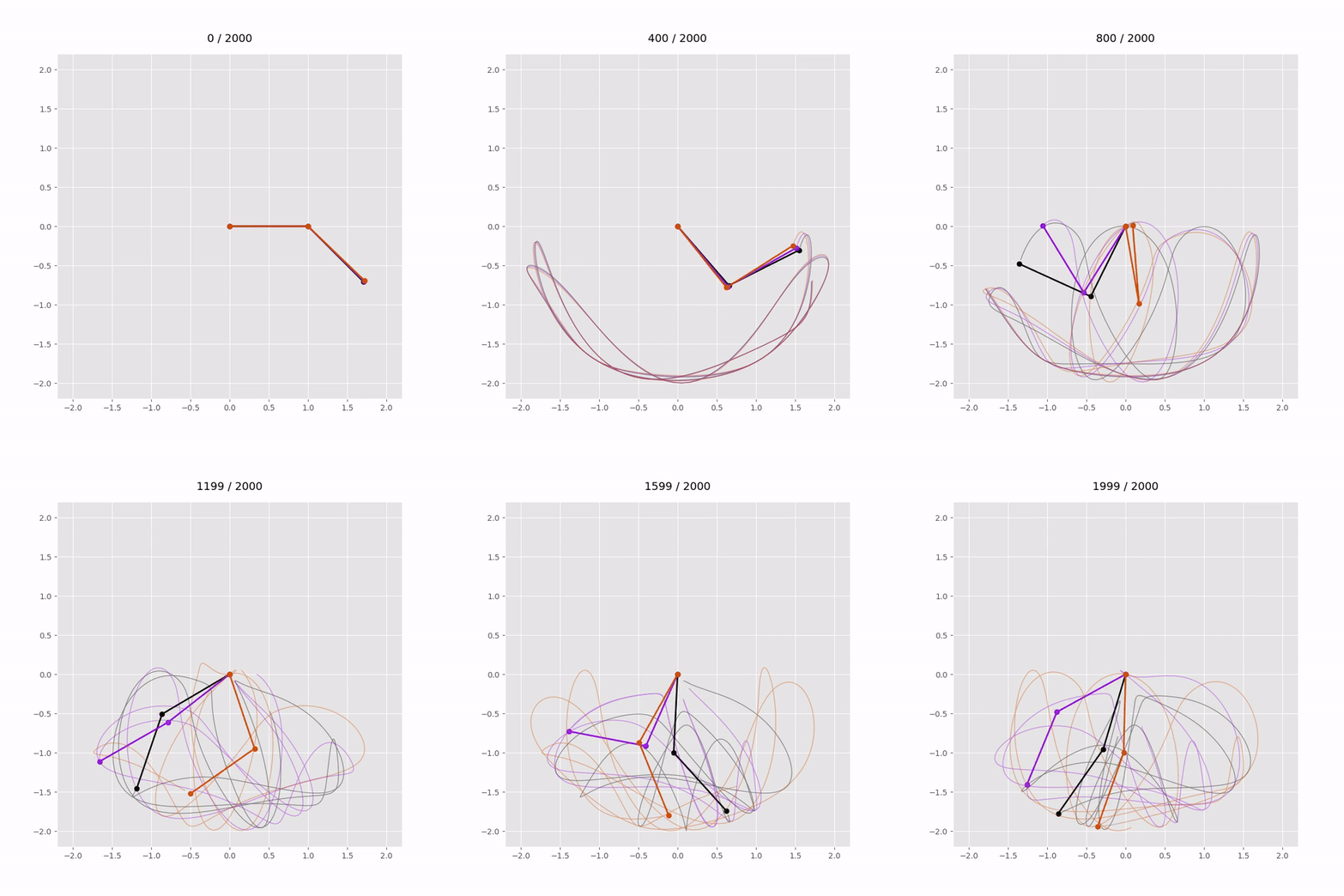
In order to test this, we create a simple script which integrates forward the system of equations using the compiled Fortran module and produces a short animation
#! /usr/bin/env python3

"""
Runs the provided f2py module to display a double pendulum animation.
The sensitivty of dynamic systems to perturbations in intial conditions
is clearly demonstrated.
"""

import numpy as np
import matplotlib.pyplot as plt
from matplotlib.animation import FuncAnimation, FFMpegWriter
from concurrent.futures import ThreadPoolExecutor

# the f2py-compiled module:
from double_pendulum import double_pendulum

# some control, global parameters
save_to_file = True

class DoublePendulum:
    """
    Two simple pendulums.
    """

    def __init__(self, m1 = 1.0, m2 = 1.0, L1 = 1.0, L2 = 1.0, g = 9.8):
        self.m1 = m1
        self.m2 = m2
        self.L1 = L1
        self.L2 = L2
        self.g = g

    def simulate(self, theta1_0, theta2_0, omega1_0, omega2_0, dt, nsteps):
        """
        Uses the f2py module to integrate forward the ODEs.
        """

        theta1, theta2, omega1, omega2 = double_pendulum.double_pendulum_rk(
            theta1_0, theta2_0, omega1_0, omega2_0,
            self.m1, self.m2, self.L1, self.L2, self.g,
            dt, nsteps
        )

        x1 = self.L1 * np.sin(theta1)
        y1 = -self.L1 * np.cos(theta1)
        x2 = x1 + self.L2 * np.sin(theta2)
        y2 = y1 - self.L2 * np.cos(theta2)

        return x1, y1, x2, y2

def runner(num = 3):
    """
    The main program runner.
    Create n pendulums, evolve them forward, then plot the lot.
    """

    # integration parameters
    dt = 0.02
    nsteps = 2000
    # since we have a simple RK4 implementation
    # the above parameters should be varied
    # to ensure stability and accuarcy of the simulations.
    # but here the only parameters that we vary
    # are slight perturbations to the the starting angle
    # of the second pendulum
    # convention dictates we name this perturbation epsilon
    eps = 0.01

    init_conditions = []
    for i in range(num):
        init_conditions.append((np.pi/2.0, np.pi/4.0 + i*eps, 0.0, 0.0))

    # define n (three) identical pendulums
    # which we will run simultaneously
    # and overlay
    pendulums = [DoublePendulum(m1=1.0, m2=1.0, L1=1.0, L2=1.0)
        for _ in range(num)]

    results = []

    def run_sim(args):
        pendulum, ic = args
        return pendulum.simulate(*ic, dt, nsteps)

    with ThreadPoolExecutor() as ex:
        results = list(ex.map(run_sim, zip(pendulums, init_conditions)))

    create_animation(results, nsteps)


def create_animation(pendulums, steps):

    plt.style.use("ggplot")
    fig, ax = plt.subplots(figsize=(8, 8))
    ax.set_xlim(-2.2, 2.2)
    ax.set_ylim(-2.2, 2.2)
    ax.set_aspect("equal")

    num_pendulums = len(pendulums)
    cmap = plt.cm.gnuplot
    colors = [cmap(i/(num_pendulums)) for i in range(num_pendulums)]

    lines = []
    trails = []
    trace_length = 500

    title = ax.set_title(f"0 / {steps}", fontsize=14, pad=15)

    for color in colors:
        line, = ax.plot([], [], "o-", lw=2, color=color)
        trail, = ax.plot([], [], "-", lw=1, color=color, alpha=0.4)
        lines.append(line)
        trails.append(trail)

    def init():
        for line, trail in zip(lines, trails):
            line.set_data([], [])
            trail.set_data([], [])
        return lines + trails

    def update(frame):

        title.set_text(f"{frame} / {steps}")

        for i, (line, trail) in enumerate(zip(lines, trails)):
            x1, y1, x2, y2 = pendulums[i]
            start = max(frame - trace_length, 0)
            line.set_data([0, x1[frame], x2[frame]], [0, y1[frame], y2[frame]])
            trail.set_data(x2[start:frame], y2[start:frame])

        return lines + trails

    ani = FuncAnimation(
        fig, update, frames=steps,
        init_func=init, interval=15, blit=True, repeat=False
    )

    if save_to_file:
        writer = FFMpegWriter(fps=20)
        ani.save("multi_double_pendulum.mp4", writer=writer)
    else:
        plt.show()


if __name__ == "__main__":
    runner()
Discussion
Since the purpose here was not so much to discuss dynamical systems as it was to demonstrate the combing of Fortran’s numerical prowess with Python’s scriptability and clean plotting, I am hesitant to discuss much regarding the simulations.
For the integration parameters \(dt = 0.015\) and \(nsteps = 2000\), it takes about \(30\) seconds for the motions of the pendulums to diverge and the movement to become unpredictable. As I mentioned in one of the code comments, these parameters must be explored to ensure the stability and convergence of the naive implementation taken here.
Anyhow, here’s the simulation as a .gif for your convenience:
And here’s one for the fun of it, which introduces many more of the pendulums (seven more, actually) and skips the beginning of the animation:

Utter chaos!
To generate the .gifs above from the .mp4 outputted from the Python script, I ran something like:
ffmpeg -ss 10 -t 130 -i input.mp4 \
    -vf "fps=20,scale=640:-1:flags=lanczos,split[s0][s1];[s0]palettegen[p];[s1][p]paletteuse" \
    -loop 0 output.gif
This cuts the first 10 seconds and runs for 130 seconds, sets the same frame rate as the original animation, and does some other things.
Conclusion
As mentioned above this post has been an exercise in write-ups, Hugo and blogging in general, more than it has been about numerical simulations and f2py, but nonetheless, I hope maybe someone will read it and find something for themselves in it, so, dear imaginary reader, thank you.
References & Recommendations
- An example of a double pendulum demonstration implemented in JavaScript may be found here.
- A better blog post discussing
f2pyis this. - The online source of the analytic system was this page.
- Fortran 95/2003 for Scientists and Engineers, S. J. Chapman, Third Edition.
- C Programming, A Modern Approach, K. N. King, Second Edition.
- F2PY: a tool for connecting Fortran and Python programs, P. Peterson, International Journal of Computational Science and Engineering, 2009.